Skip to content

The First Local-First AI Render for SketchUp

First Local-First AI

LizArk Ai Render for SketchUp: Local AI Architectural Rendering

The first local-first AI rendering extension for Trimble SketchUp. Turn SketchUp views, clay massing models, and scenes into photorealistic architectural renders directly on your GPU with zero cloud uploads and no credits to burn.

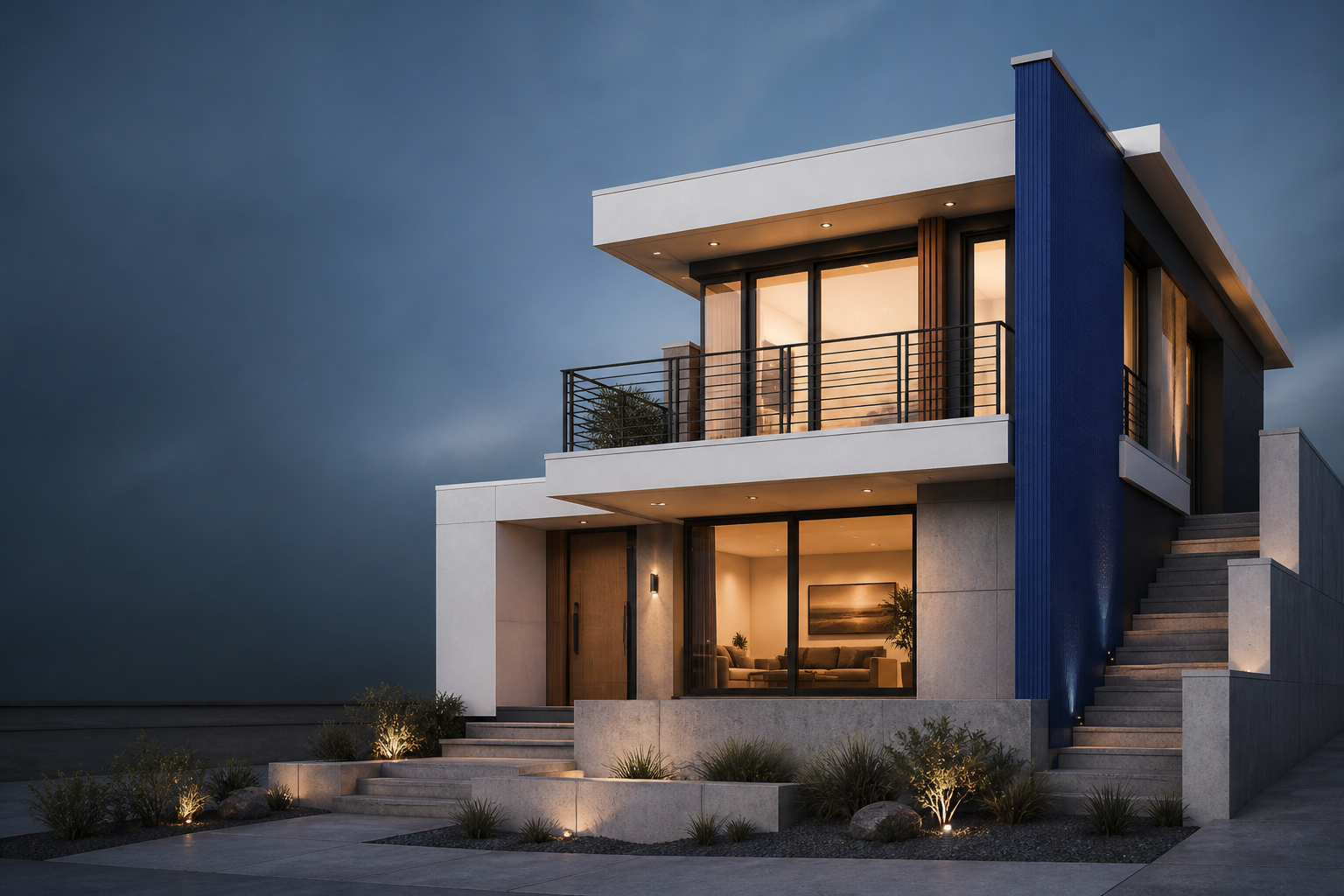
LizArk Ai Render for SketchUp: Contemporary architectural exterior rendered photorealistically from a SketchUp viewport model
Concept image. Your result starts from a SketchUp view or an imported render.
  • First Local-FirstPioneering 100% on-device AI generation for SketchUp.
  • No Credits to BurnUnlimited local renders directly on your hardware — zero per-image fees.
  • 100% PrivateZero cloud uploads. Your 3D models and renders never leave your PC.
  • NVIDIA OptimizedHardware CUDA acceleration for RTX 30, 40, & 50 series (CPU fallback included).
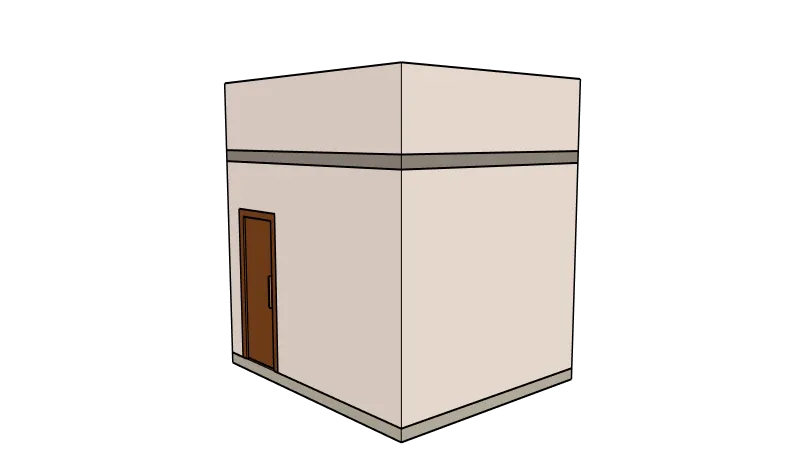
Simple SketchUp model used as a starting point for visualisation

Keep your SketchUp model in the driver's seat with LizArk Ai Render.

Start with the view you already have, then direct the visual finish without leaving the SketchUp workflow.

  • Capture the current viewport or bring in an existing beauty render.
  • Describe materials, lighting, atmosphere, and presentation intent.
  • Use references and regional edits when one part needs a different treatment.
  • Keep the original source available for comparison and another pass.

Four native SketchUp AI rendering workflows in LizArk Ai Render.

LizArk Ai Render gives you a focused path from SketchUp viewport geometry to controlled architectural visualization.

Four core workflows

Generate new concepts from text, guide geometry with Structure ControlNet (Canny & HED edge-detection), edit targeted parts with brush-mask inpainting, or enhance realism while preserving walls and openings with the built-in structural fidelity guard.

First local-first engine: zero credits to burn

LizArk Ai Render is the first local-first AI rendering extension for Trimble SketchUp. Unlike cloud platforms that charge monthly tokens and metered per-render fees, local offline models run directly on your own GPU with zero credits to burn and unlimited iterations.

Camera & Viewport Geometry Sync

Lock camera perspective, field-of-view, and structural lines directly from your active SketchUp viewport. Seamlessly match render outputs to your model without camera shifts or projection distortions.

Neural AI upscaling to 2K & 4K

Go beyond standard resolution with 4x UltraSharp neural upscaling tuned for architectural detail, Real-ESRGAN 4x, and clean 2x Lanczos exports with crisp textures and fine linework.

Multi-reference & role packs

Assign references dedicated roles: Style, Material, Geometry, Object Identity, or Context. Save, organize, and reload named Reference Packs across your projects.

AI Scene Director & Outpainting

AI vision inspects viewport lighting, composition, and materials to generate tailored prompt briefs. Expand your canvas outward in 32px steps to reveal the surrounding landscape and site context.

Optimized for modern hardware

Automated setup targets your GPU architecture: cu130 for RTX 50 (CUDA 13.0), cu128 for RTX 30/40 (CUDA 12.8), and CPU fallback mode for low-resource environments. Pause and resume model downloads anytime.

One model. Three ways to communicate.

Render makes the image. Player and Exploded View carry the same model into review and assembly documentation.

  • Render

    Create local AI concept images from a SketchUp view or imported render.

    See plans
  • Present

    Lizark Player packages saved views, tag states, branding, client review, and option comparison for an offline browser handoff.

    View Player
  • Explain

    Lizark Exploded View adds assembly steps, camera paths, callouts, manuals, and BOM exports for the same model.

    View Exploded View

From download to first render in minutes.

Managed, isolated setup designed specifically for SketchUp on Windows. No system Python conflicts, no terminal commands required.

1

Install the .rbz

Download the LizArk Render extension and install it in SketchUp via Window > Extension Manager > Install Extension. The toolbar appears immediately.

2

Automated runtime setup

Open the Settings drawer and run Setup & repair. The installer provisions an isolated CPython 3.10 environment in %LOCALAPPDATA%\LizArkRender with hardware-optimized CUDA (RTX 50 or 30/40) or CPU wheels.

3

Catalog model manager

Open the Models library tab to download verified open models (FLUX.2 Klein, Z-Image Turbo, SANA 1.6B) from Hugging Face with pause, resume, and disk management.

4

Render locally & privately

Start rendering free right away without account registration. Pro users simply paste their LZK1… offline key to unlock 2K resolution, contact sheets, and neural upscaling.

LizArk Ai Render system requirements: Windows only, NVIDIA optimized.

LizArk Ai Render is built exclusively for 64-bit Windows with dedicated hardware CUDA acceleration profiles for modern NVIDIA RTX graphics cards. Review compatibility details below.

Operating System

Windows Only

Windows 10 or Windows 11 (64-bit)

Native Windows desktop extension. macOS is not supported due to CUDA acceleration and PyTorch ML runtime dependencies.

Graphics Card (GPU)

NVIDIA Optimized

NVIDIA GeForce RTX 30, 40, or 50 Series

Engineered with hardware CUDA acceleration: cu130 for RTX 50 series (Blackwell, FP4/NVFP4) and cu128 for RTX 30 & 40 series (Ampere/Ada Lovelace, FP8). 8 GB+ VRAM recommended (12 GB+ for 2K output).

CPU Fallback Mode

Non-GPU Support

Multi-core CPU Profile

No dedicated NVIDIA GPU? LizArk Render includes a built-in offline CPU runtime profile. Test workflows and preview concept renders completely offline on non-RTX systems (16 GB+ RAM recommended).

Storage & Local Runtime

SSD Required

25 GB Free SSD Space

Allocated for the isolated embedded CPython 3.10 environment and downloaded model checkpoints in %LOCALAPPDATA%\LizArkRender (12 GB for CPU profile).

SketchUp Compatibility

Host Software

SketchUp Pro 2022 to 2026

Standard Trimble .rbz extension installed through Extension Manager. SketchUp Make and browser-based SketchUp Free are not supported.

Internet & Licensing

Online Setup & Pro

Internet for models & Pro activation

An active internet connection is required to download AI model weights from the catalog and to activate or renew your Pro license key. Once models are installed, local rendering runs offline on your PC (Pro includes a 72-hour offline grace period).

LizArk Ai Render Free vs Pro: choose your workflow.

Use the core workflow for free. Upgrade when you need more control, more output, and more room for production work.

Free

$0 to start

No payment activation required. Unlimited local rendering with zero credits to burn.

  • 512×512 square and aspect-ratio preview presets (16:9, 4:3, 3:4, 9:16)
  • Deterministic bottom-right "LizArk Ai Render" watermark
  • 1 rendered image output per job (single-seed generation)
  • 1 reference image (Style, Material, Geometry, Object Identity, or Context)
  • 1 active brush-mask inpainting area for targeted edits
  • 6 core style presets (Photoreal Daylight, Golden Hour Dusk, White Clay, Sun Exterior, Sun Interior, Product Studio)
  • Standard 1x output export (PNG and JPG)
  • 100% keyless local use — no account or payment activation required
6 Months

Pro (6 Months)

$29 USD

or ₹2,999 INR (India UPI / Cards)

Flexible semi-annual plan. Unlimited watermark-free 2K & 4K renders directly on your GPU — zero token or per-render fees.

  • 100% watermark-free, presentation-ready client deliverables
  • Full resolution: 1024×1024, widescreen 1344×768, portrait 768×1344, and 2K (2048×2048, 2048×1152) up to 4096
  • Batch variations: render 1, 2, 3, or 4 options as a contact sheet in a single job
  • Neural AI upscaling: 4x UltraSharp architectural upscaler, Real-ESRGAN 4x, and 2x export
  • Multi-reference editing with 5 role tags + saved Reference Packs (save, load, and delete)
  • Directional canvas expansion (outpainting) in 32px increments to widen site context
  • Camera and geometry structural fidelity guard to lock structural elements
  • Complete style preset library (Scandinavian, Tropical, Luxury, Fog, etc.) plus custom presets
  • Searchable prompt gallery history with re-render, seed restoration, and local cleanup
  • Offline Ed25519 license key with 72-hour grace period and seamless machine transfer

Clear limits by design. Pro removes artificial plan-tier caps, not engine, GPU, memory, format, concurrency, storage, or safety limits. Models download locally after you choose to install them. See system requirements.

Download LizArk Ai Render for SketchUp (.rbz)

Get started with the free LizArk Ai Render extension. Complete the quick social unlock and accept the license terms to download the installer (.rbz) immediately.

Trimble SketchUp 2022–2026 Windows 10 / 11 (64-bit) Version 1.0 (.rbz)
Unlock Free Download (Choose Any 1 Platform)

Choose any 1 platform above. Clicking Subscribe or Follow on any single channel unlocks the download immediately.

Read Full EULA & Legal Notice (5 Clauses) Expand

1. Grant of Single-Seat License:

Lizatek grants you a personal, revocable, non-exclusive, non-transferable, single-seat license to install and run LizArk Render solely as an extension within Trimble SketchUp on 64-bit Windows. The software is licensed, not sold.

2. Strict Prohibition on Reverse Engineering & Decompilation:

You shall not, directly or indirectly: (a) decompile, disassemble, decrypt, unpack, or reverse engineer any binary, native library, encrypted bytecode, or Ruby script; (b) inject hooks, trace execution, dump runtime memory, or extract proprietary algorithms; or (c) modify, patch, or create derivative works from this software.

3. Absolute Ban on Redistribution, Reselling & Mirroring:

This software and its installer (.rbz) are strictly non-redistributable. You are strictly forbidden from uploading, sharing, mirroring, hosting, sublicensing, reselling, or distributing the package via websites, forums, torrents, cloud storage, Discord, Telegram, or any digital channel.

4. Protection of Security & Anti-Piracy Controls:

Any attempt to tamper with, bypass, neutralize, spoof, or modify license verification tokens, hardware ID bindings, cryptographic signatures, or API communication constitutes a material breach and grounds for immediate permanent device/license blacklisting.

5. Civil Statutory Damages & Criminal Enforcement:

Willful infringement or unauthorized distribution will be aggressively prosecuted to the fullest extent of the law, including statutory copyright damages (up to $150,000 per violation under the DMCA, Indian Copyright Act 1957, and international IP treaties), injunctive relief, recovery of all legal fees, and criminal prosecution.

Download statistics unavailable

Free tier is 100% keyless. Internet required to download models from catalog & activate Pro. See requirements.

Upcoming Capabilities

Future Releases

Product Roadmap & Next Horizons

We are actively extending LizArk Ai Render with high-throughput cloud acceleration, cinematic multi-frame synthesis, and deep SketchUp geometric passes. Here is what is on our release horizon.

In Development
Q3 / Q4 2026

Cloud AI Rendering & Managed GPU Clusters

Optional off-device cloud rendering for MacBook, ultrabook, and low-VRAM Windows workstations. Seamlessly dispatch 4K render passes to high-performance remote GPU clusters with zero local memory overhead while keeping your SketchUp project completely in sync.

In Design
Q4 2026

ControlNet Depth & Normal Buffer Sync

Extract native 32-bit viewport Z-depth maps and surface normal buffers directly from Trimble SketchUp's rendering pipeline to provide pinpoint geometric guidance and eliminate perspective drift on intricate architectural facades.

Planned
2027

Multi-Frame Animation & Camera Walk-throughs

Temporal latent consistency for smooth, flicker-free camera animations across SketchUp scene tabs. Generate presentation-ready flythroughs, daylight transitions, and walk-through videos directly inside SketchUp.

Planned
2027

PBR Material & Texture Map Generation

One-click procedural texture generation from text prompts and moodboards. Generates seamless diffuse, roughness, normal, displacement, and ambient occlusion maps ready for SketchUp materials and real-time engines.

Questions before you render.

What is LizArk Ai Render for SketchUp?

LizArk Ai Render for SketchUp is the first local-first AI architectural rendering plugin for Trimble SketchUp (2022–2026 on Windows 10/11). It converts SketchUp viewports, clay massing models, or imported 3D scenes into photorealistic architectural imagery directly on your NVIDIA GPU with zero cloud uploads and no credits to burn. Four core workflows are supported: text prompt generation, Structure ControlNet edge-guidance (Canny/HED), brush-mask inpainting, and realism enhancement with structural fidelity protection.

Are there any credits or tokens to burn when rendering?

No! LizArk Ai Render has absolutely zero credits to burn, no token balances, and no metered per-image fees. Once open diffusion models are installed locally, you can render, iterate, and experiment completely unlimited on your own GPU or CPU.

Why is LizArk Ai Render called the first local-first AI render for SketchUp?

LizArk Ai Render is the first extension in the SketchUp ecosystem built on an entirely local-first ML architecture. Rather than uploading your proprietary 3D CAD geometry, textures, and client designs to third-party cloud servers, LizArk provisions an isolated local Python and PyTorch runtime in %LOCALAPPDATA%\LizArkRender to run open models (FLUX.2 Klein, Z-Image Turbo, SANA 1.6B) natively on your NVIDIA RTX GPU.

How do I install LizArk Ai Render in SketchUp?

Installation takes 4 steps: 1) Download the free .rbz file and install it in Trimble SketchUp via Window > Extension Manager > Install Extension; 2) Open LizArk Render from Extensions and run the automated runtime setup, which creates an isolated embedded Python 3.10 environment with CUDA acceleration; 3) Open the Models catalog tab and download your preferred models from Hugging Face using the built-in pause/resume download manager; 4) Render unlimited views immediately.

What are the system requirements for LizArk Ai Render for SketchUp?

LizArk Ai Render for SketchUp runs on 64-bit Windows 10 and Windows 11 with Trimble SketchUp Pro 2022 to 2026. For high-speed GPU rendering, an NVIDIA GeForce RTX GPU (RTX 30, 40, or 50 series) with 8 GB+ VRAM is recommended (12 GB+ for 2K output). An offline multi-core CPU profile is also included for non-NVIDIA systems. Disk space required is 25 GB on SSD for the CUDA runtime and models (12 GB for CPU profile).

Can I use LizArk Ai Render without an NVIDIA RTX graphics card?

Yes! LizArk Ai Render includes a built-in offline CPU runtime profile that runs completely locally without an NVIDIA graphics card. While GPU acceleration is significantly faster for production rendering, CPU mode ensures any Windows PC with 16 GB+ RAM can generate concept previews and test workflows.

What is included in LizArk Ai Render Free?

Free is 100% keyless and requires no payment or account registration. It renders at 512×512 preview resolution (or aspect-ratio presets capped at 512 px) with a subtle bottom-right "LizArk Ai Render" watermark. Free includes 1 output per run, 1 reference image, 1 brush-mask inpainting region, and 6 core architectural style presets.

What features does LizArk Ai Render Pro unlock?

Pro unlocks presentation-grade deliverables: 100% watermark-free output, high-resolution rendering up to 2K/4K (1024×1024, widescreen 1344×768, 2048×2048, up to 4096 px), batch variation contact sheets (up to 4 options per run), 4x UltraSharp neural AI upscaling, multi-reference packs with 5 role tags, 32px directional canvas outpainting, camera/geometry structural preservation guard, full preset library + custom presets, and local prompt search.

How much does LizArk Ai Render Pro cost?

LizArk Ai Render Pro is available in two plans: 6 Months ($29 USD internationally or ₹2,999 INR in India) and Yearly ($49 USD/year internationally or ₹4,999 INR/year in India). Both plans include unlimited watermark-free 2K and 4K renders directly on your GPU with zero per-render token fees, batch contact sheets, 4x UltraSharp neural upscaling, canvas outpainting, and multi-reference packs. Checkout is securely processed via Dodo Payments with local UPI and Cards in India.

Does LizArk Ai Render require an internet connection?

An internet connection is required only during initial setup to download open AI model checkpoints (such as FLUX, Z-Image, and SANA) from Hugging Face and to activate your Pro license key. Once models are downloaded, rendering runs 100% offline on your PC with zero cloud dependence. Pro includes a 72-hour offline grace period.

How does offline license activation work in LizArk Ai Render?

When you purchase Pro, you receive an Ed25519-signed license token (LZK1...). You activate this key in SketchUp once. LizArk Render verifies the token completely offline using embedded public cryptographic keys without periodic server pings. A 72-hour grace window protects against connection drops, and you can release your license key anytime to switch machines.

Which AI models and diffusion pipelines are supported in LizArk Ai Render?

The catalog includes state-of-the-art open diffusion architectures: FLUX.2 Klein 4B (NVFP4, GGUF Q5, BF16), FLUX.1 Schnell (Q4), Z-Image Turbo (FP8) & Z-Image ControlNet Union 2.1, ERNIE Image Turbo, SANA 1.6B (FP8 / BF16) & SANA ControlNet (HED), plus neural upscalers including 4x-UltraSharp and Real-ESRGAN x4plus.

What happens to my projects if my LizArk Ai Render subscription lapses?

Your 3D SketchUp models, scene settings, and saved render gallery files remain on your PC forever. Downgrading never deletes your files. If your subscription lapses, new render jobs simply output at the Free tier specifications until Pro is renewed.

Make the image. Keep the workflow moving.

Start with a local render, then send the same project into Player or Exploded View when the story needs a handoff.

Compare plans

Need help with LizArk Ai Render?

Send us a LizArk Ai Render support request and we will get back to you within one business day.