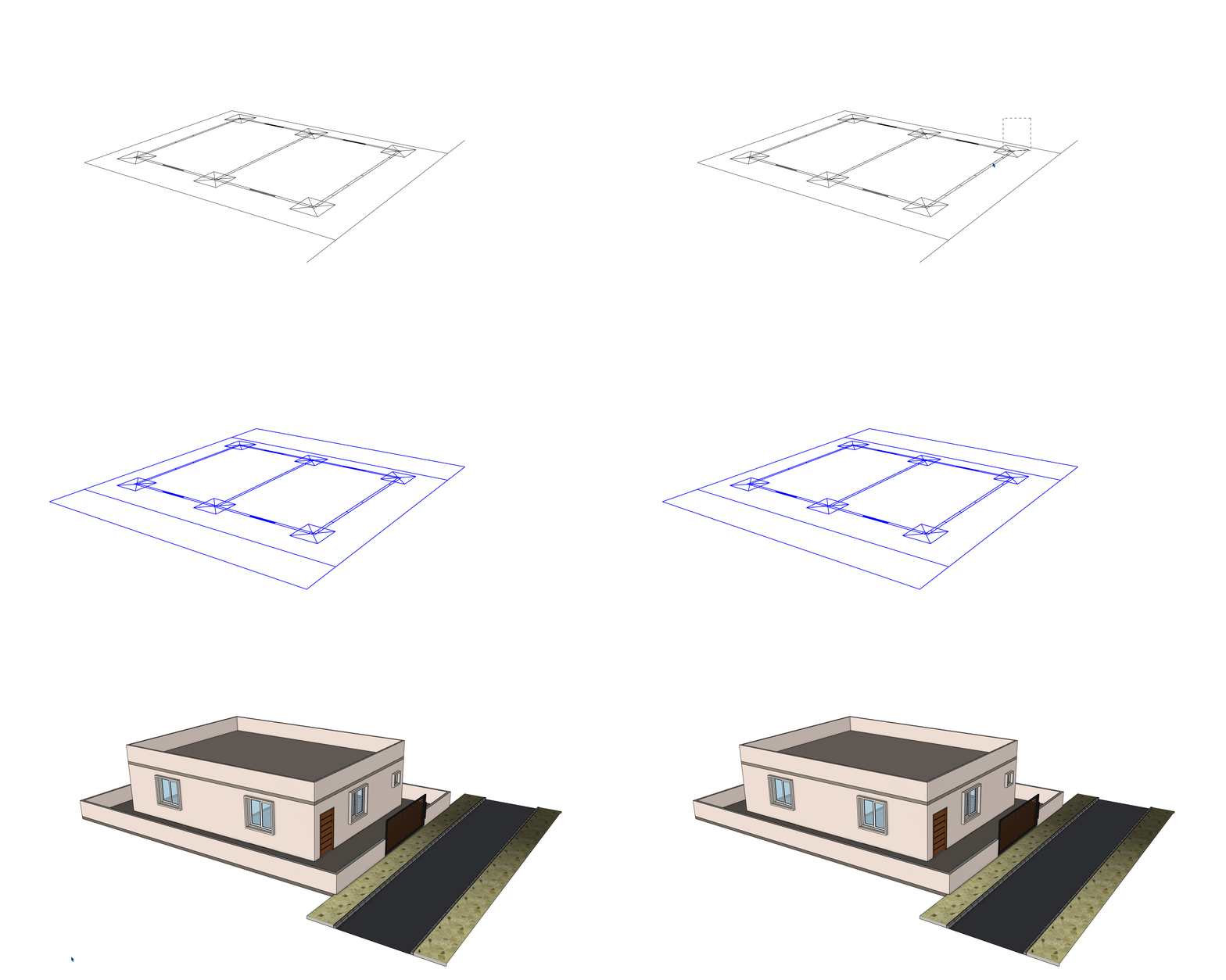
SketchUp Extension

Auto Detect Plans
Convert to 3D
in 1 Click.

Xpress 3D introduces a first-of-its-kind SketchUp workflow for auto floor plan detection and 1 click 3D conversion, built for up to 99% accurate recognition on clean plan inputs, with PDF vector support, JPG/PNG/PDF import workflows, elevation output and roads.

  • Auto Plan Detection + 1 Click 3D Conversion
  • Elevation-Ready Floor Stack Generation
  • Roads, Junctions & Site Network Tools
  • PDF Vector Support + JPG/PNG/PDF Plan Import
  • Built for up to 99% Accurate Plan Recognition

Main Features and Tools

Updated from the active Xpress_3D toolbar, Web Draw, import, road, rail, and generator modules.

1 Click Auto Plan to 3D

A first-of-its-kind Xpress 3D workflow for detecting clean floor plans and converting prepared PDF vector plans, JPG/PNG/PDF imports, DWG/DXF or traced data into a full editable SketchUp 3D model.

  • Auto-detect plan intent from clean drawings before generating model geometry.
  • Built for up to 99% accurate plan recognition on properly prepared inputs.
  • Generate walls, openings, floors, roof and structural elements from plan data.
  • Use vector-aware PDF support where available, with JPG/PNG/PDF import workflows for plan references.
  • Use the main Generate 3D workflow as the headline launch experience.
  • Best results come after tags, layers and opening markers are reviewed.

Floor Stack to Elevation

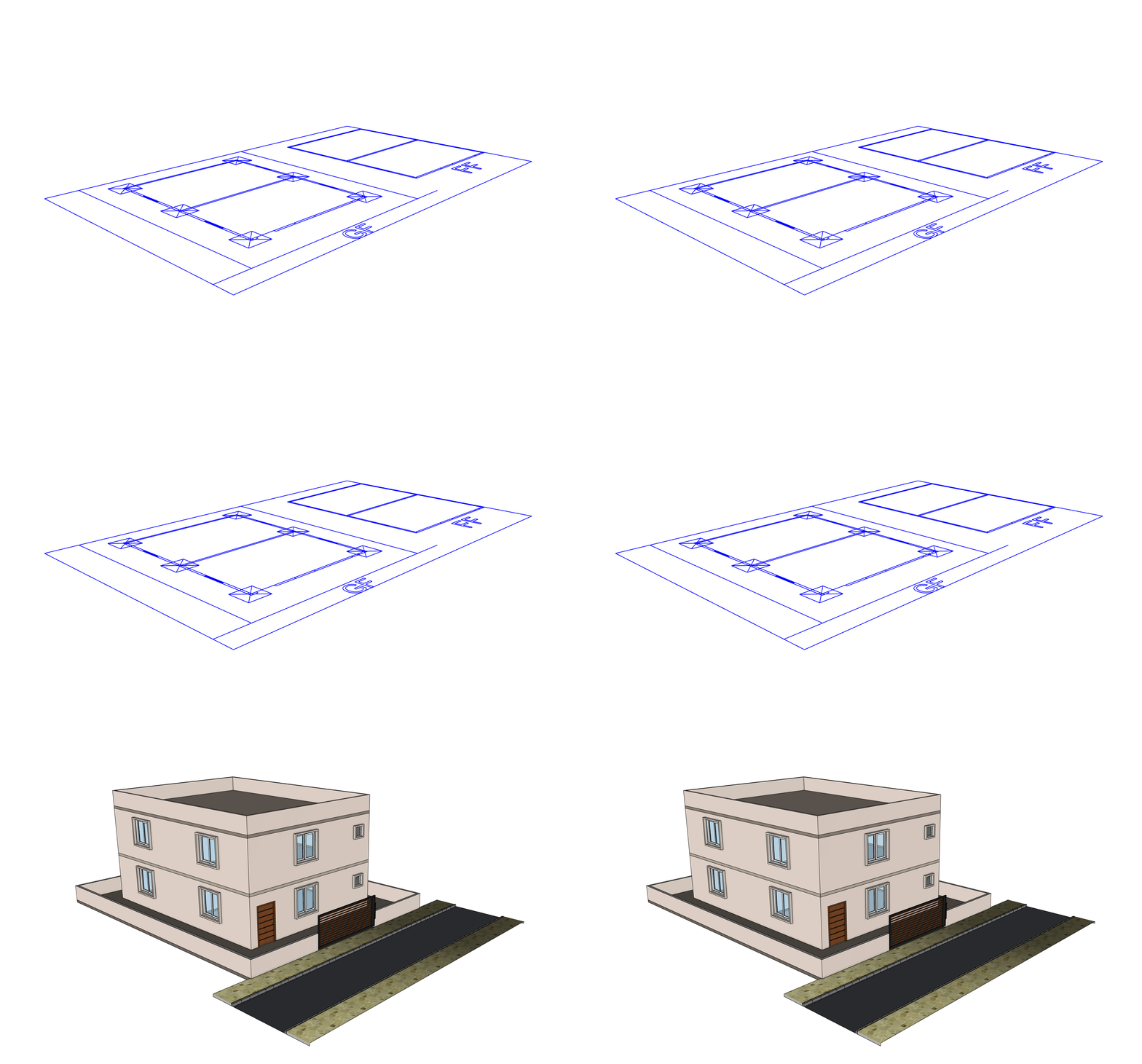
Use the To Elevation workflow to stack plans and prepare multi-floor elevation-ready output.

  • Stack repeated or selected floors into an elevation workflow.
  • Keep floor context, levels and generated elements organized.
  • Useful for presenting plan-to-building progression after generation.
  • Carry floor-specific tags into the generated model so each level remains easier to review.
  • Use repeat-floor controls when similar plans need consistent wall, opening and roof output.
  • Pair with incremental rebuild when only a selected floor zone needs correction before elevation.
  • Prepare a clearer bridge between 2D plan generation and elevation presentation.

Roads and Site Network

Generate site roads with Xpress Roads Pro, including corridors, curves, crossings, signs and junction tools.

  • Draw road centerlines and generate road corridors.
  • Use Roads Pro for curves, imported paths, crossings, signs and junctions.
  • Show roads as a launch pillar beside building generation and elevation.
  • Generate roundabouts, cul-de-sacs, hammerheads and all-junction road layouts where supported.
  • Edit selected roads and reshape road nodes after generation.
  • Configure kerb, footpath, road markings and signage from the Roads Pro settings workflow.
  • Use path import when site linework already exists in the SketchUp model.
Plan to Model 9 tools

Automated 3D Generation

Detect clean 2D plans and convert them into editable 3D models.

  • Auto Plan Detection Identify plan walls, openings and structural cues from prepared floor plan references.
  • Generate 3D Build walls, openings, floors, roof, structure and finish layers from prepared plan data.
  • Update 3D Run a smart refresh after edits, using full generation or selected-zone rebuild.
  • To Elevation Stack repeated floor plans into an elevation-ready model workflow.
  • Incremental Rebuild Regenerate selected edited walls or openings without rebuilding the whole project.
  • Floor, Roof and Finish Output Generate floor plates, roof forms, skirting, wall color/material output and related finish layers.
  • Chejja/Sunshade Generation Generate opening-linked chejja/sunshade elements where the opening workflow provides usable context.
Feature notes
  • Launch positioning: first-of-its-kind auto plan detection and 3D conversion workflow for SketchUp.
  • Designed for up to 99% accurate recognition on clean, properly scaled architectural plan inputs.
  • Uses the main Builder workflow for wall extrusion, opening generation and model output.
  • Includes floor/roof engine, skirting, wall colorizer, material and chejja generator modules in the 3D output path.
  • Supports repeat-floor and elevation preparation workflows currently present in the plugin.
  • Best used after plan tags/layers and opening markers are reviewed.
  • Detection output is routed through wall, opening and structural generator modules rather than a single flat import step.
Manual Modeling 11 tools

Drawing Tools Inside SketchUp

Draw accurate walls, rooms, roofs, and layouts.

  • Draw Wall Draw wall runs with thickness, height, alignment, dimensions and corner handling.
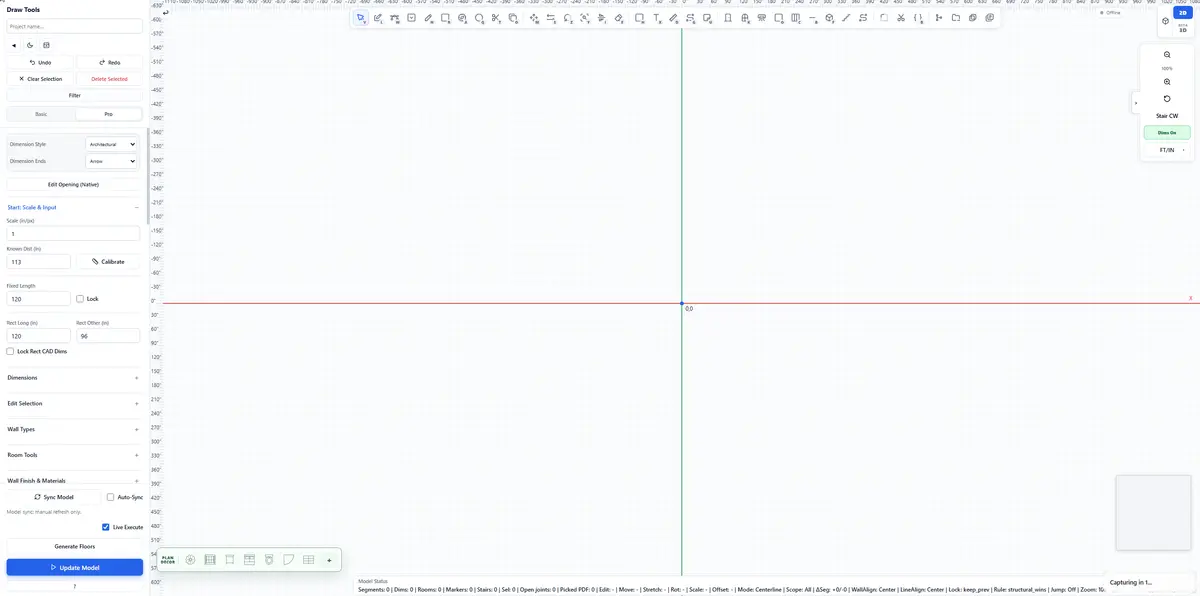
  • Web Draw Wall Use the main canvas workflow for walls, openings, stairs, roads and structural items.
  • Draw Compound Wall Create compound or boundary walls with custom thickness and height.
  • Place Room Place rectangular rooms from two corners and join them to nearby wall geometry.
  • Curved Wall Draw arc-based walls and keep the curved-wall opening path available.
  • Add Roof Generate roof forms from selected walls or boundary data.
  • Line/Context Wall Generation Generate walls from selected linework or context-menu driven wall workflows when supported by the model state.
Feature notes
  • Focused on direct SketchUp drawing when imported plans need manual correction.
  • Web Draw Wall is the key visual workflow and should be shown with the strongest video preview.
  • Supports both native viewport tools and the HTML canvas drawing interface.
  • Wall tools include visible dimensions, restart snapping, corner handling and right-click wall edit options.
  • Manual tools are useful after auto detection when a plan needs a local correction instead of full regeneration.
  • Room, roof and wall tools stay separate so users can model only the part they need.
Openings 14 tools

Doors, Windows, Ventilators & Panels

Place wall-aware openings with preview and cuts.

  • Draw Door Place door templates on wall faces with wall-cut behavior.
  • Draw Gate Place gate openings with preview and wall-safe placement.
  • Draw Window Place window presets on detected host walls.
  • Corner Window Place corner windows across two joined walls.
  • Window Type Panel Open a panel for choosing and managing window presets.
  • Draw Ventilator Place ventilators with wall snapping and opening behavior.
  • Panel Designer Build sash, glass and spacing layouts for panel-style openings.
Feature notes
  • Opening tools are wall-aware and designed around preview, host-wall detection and cutter/heal paths.
  • Includes separate workflows for standard windows, corner windows, ventilators and custom panels.
  • Movement and edit tools should be presented as controlled edit workflows, not as freeform geometry edits.
  • Opening detection, cutting, regeneration and chejja output are separate modules that work together during generation.
  • Move and edit actions are designed to keep wall cuts and generated opening metadata in sync.
Trace & Import 12 tools

PDF, DWG/DXF and 2D Tracing

Import plans, trace markers, and convert to 3D.

  • Import PDF Import PDF floor plans with vector-aware support, scaling and preview workflow.
  • Import JPG/PNG Bring raster plan images into the import workflow for tracing, cleanup and scaling.
  • Import DWG/DXF Import CAD plans with native options and layer controls.
  • CAD Preprocessing Prepare imported CAD geometry with layer inheritance, wall/column/beam mapping and cleanup before recognition.
  • Trace Wall 2D Trace wall pairs from imported plan references.
  • Trace Compound Wall 2D Trace boundary or compound wall pairs separately.
  • Trace Opening Markers Place door, gate, window and ventilator markers before generation.
Feature notes
  • Highlights PDF vector support while still supporting JPG/PNG/PDF plan import workflows.
  • Keeps PDF/image import and DWG/DXF CAD import as separate workflows.
  • Trace tools help when automatic recognition needs manual cleanup or confirmation.
  • Layer and tag preparation remains important before final 3D generation.
  • DWG preprocessing handles layer names and entity inheritance so recognition can route walls, columns, beams and openings more reliably.
  • Tracing and import tools provide a controlled fallback when source drawings are not clean enough for full automation.
Stairs & Rails 7 tools

Stairs, Railings & Structural Tools

Add stairs, parametric railings, columns, beams, and slabs.

  • Auto Stairs Generate stairs with direction controls for stair layout selection.
  • Toggle Stair Direction Switch circular/auto stair direction where the stair workflow supports it.
  • Draw Stair Draw straight and dog-leg stairs with interactive preview behavior.
  • Railing Builder Create parametric railings along selected or drawn paths.
  • Xpress Rail Use the embedded rail path workflow for dedicated railing generation.
  • Rail Edit, Library and Cut List Edit generated rail instances, manage rail assets and review cut-list style reports.
  • Structural Output Generate columns, beams, footings, slabs, skirting and related structural elements.
Feature notes
  • Stair tools include both auto and drawn workflows, with preview-first behavior.
  • Structural output is tied to detected or drawn column, beam, footing and floor data.
  • Rail features are powered by the embedded Xpress Rail bundle with path drawing, editing and library support.
Control 10 tools

Settings, Tags and Preflight

Manage setup, tags, checks, and tool access.

  • Settings Open generation options, toolbar visibility and plugin configuration controls.
  • Tag Tool Create or repair required Xpress 3D tags used by tracing and generation.
  • Selection Tagging Tag selected entities as walls, openings, structural elements, generation markers or levels.
  • Preflight Check Find common setup issues and apply safe fixes before output.
  • Toolbar Palette Use a floating palette with main tools and trace/utilities rows.
  • Generation Logs and Error Handling Use internal generation logging, user-friendly error reporting and preflight summaries for safer workflows.
  • Toolbar Layout Controls Control main and trace toolbar visibility and saved toolbar layout from settings.
Feature notes
  • Helps prepare models before import, tracing, generation or repeat-floor workflows.
  • Tag repair is important for keeping generated output organized and recognizable.
  • Preflight should be presented as a safety check, not a guarantee of perfect geometry.
  • Settings, tags, toolbar visibility and utility commands help keep large plan-to-3D projects controllable.
  • Control features are operational tools for production use, especially when handling imported CAD/PDF plans with many layers.
  • Diagnostics and logs help support debugging without requiring users to inspect raw Ruby code.

Xpress 3D FAQ

Short answers for search engines, AI answer engines, and architects comparing SketchUp automation tools.

What is Xpress 3D?

Xpress 3D is a SketchUp extension for auto floor plan detection and 1 click conversion of prepared 2D architectural plans into editable 3D building and site models.

Is Xpress 3D a first-of-its-kind auto plan detection workflow?

Xpress 3D is positioned as a first-of-its-kind SketchUp workflow that combines auto plan detection, plan-to-3D conversion, elevation preparation, roads, openings and structural tools in one launch package.

What does 99% accurate plan conversion mean?

The 99% accuracy claim refers to the product target for clean, properly scaled and readable architectural plan inputs. Results can vary with scan quality, layer quality, drawing standards and whether the source is vector PDF, CAD, JPG or PNG.

Which file types does Xpress 3D support?

Xpress 3D includes workflows for vector-aware PDF plan import, JPG/PNG/PDF image import workflows for tracing and cleanup, and DWG/DXF CAD import with layer control.

Can Xpress 3D create doors and windows?

Yes. It includes wall-aware tools for doors, gates, windows, corner windows, ventilators, custom panels and editable openings.

Can Xpress 3D generate elevation-ready models?

Yes. The To Elevation workflow is designed to stack repeated or selected floor plans and prepare the model for elevation-ready 3D presentation.

Does Xpress 3D include road and site tools?

Yes. Xpress Roads Pro supports road corridors, curved roads, path import, crossings, signs, junctions, roundabouts and node editing.

What road tools are included with Xpress Roads Pro?

The embedded Roads Pro tools include straight and curved roads, selected-edge or path import, zebra crossings, signs, custom signs, intersections, all-junction generation, roundabouts, cul-de-sacs, road editing, node editing and road settings.

Does Xpress 3D include railing tools?

Yes. The embedded Xpress Rail workflow includes railing generation, rail path drawing, editing selected rail instances, asset/library support and cut-list style reporting.

Can Xpress 3D generate finish and sunshade details?

Xpress 3D includes generation paths for floor and roof output, skirting, wall color/material output and chejja or sunshade elements where the plan and opening context supports them.

How does Xpress 3D prepare CAD files for recognition?

The CAD preprocessing workflow helps route imported geometry through layer inheritance and layer-key mapping so walls, compound walls, columns, beams and opening markers can be recognized more reliably before generation.

Why are tags and preflight checks important?

Tags and preflight checks help prepare the SketchUp model before generation. They can create or repair required tags, mark selected entities, identify common setup issues and apply safe fixes before running plan-to-3D output.

When should users use Web Draw Wall?

Web Draw Wall is useful when a user wants to sketch or correct a plan in a focused canvas before generating walls, openings, stairs, roads, columns, beams and footings in SketchUp.