

What Tag Manager does
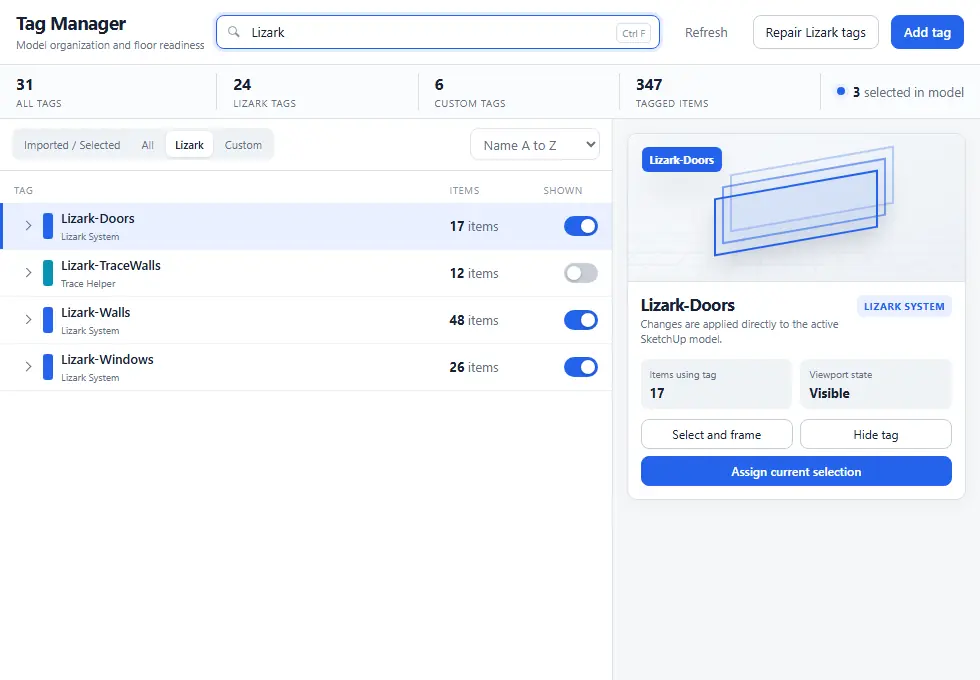
Tag Manager is the model-organization view for LizArk tags. The live dialog reports tag totals and tagged items, filters imported or selected tags, Lizark system tags, and custom tags, and opens an inspector for the selected row. Use it to audit the model before generation or to repair tag visibility and selection assignments.
Tagging workflow
- Launch Tag Manager and choose Imported / Selected, All, Lizark, or Custom from the filter strip.
- Search by tag name or tag type, then select a row to open its inspector and see item counts and visibility.
- Use Select and frame to inspect the entities behind a tag, or Show tag / Hide tag to audit visibility.
- Select model entities in SketchUp and use Assign current selection to apply the selected tag.
Controls
Use the search field, filter strip, and sort menu to find a tag quickly. Repair Lizark tags checks the managed system tags, while Add tag opens the create panel for a custom model tag.
The inspector on the right shows the selected tag type, item count, visibility, and actions. Imported or custom asset tags can expose additional asset controls when a linked SKP is available.
Tips
Keep trace markers on their dedicated trace roles. Generate 3D skips markers that do not have the expected role.
Do not overwrite internal LizArk roles unless you understand the downstream impact.
Tag Manager is also useful for fixing entities that were exploded or copied from other models and lost their metadata.
